# useSupabaseClient
> Make requests to the Supabase API with the useSupabaseClient composable
[Auto-import](https://nuxt.com/docs/guide/directory-structure/composables) your client inside your vue files.
This composable is using [supabase-js](https://github.com/supabase/supabase-js/) under the hood, it gives access to the [Supabase client](https://supabase.com/docs/reference/javascript/initializing).
> The client is initialized with the `NUXT_PUBLIC_SUPABASE_KEY` you must have in your `.env` file. It establishes the connection with the database and make use of user JWT to apply [RLS Policies](https://supabase.com/docs/learn/auth-deep-dive/auth-row-level-security) implemented in Supabase. If you want to bypass policies, you can use the [serverSupabaseServiceRole](https://supabase.nuxtjs.org/services/serversupabaseservicerole).
## Authentication
The useSupabaseClient composable is providing all methods to manage authorization under `useSupabaseClient().auth`. For more details please see the [supabase-js auth documentation](https://supabase.com/docs/reference/javascript/auth-api). Here is an example for signing in and out:
If you want a full explanation on how to handle the authentication process, please read this [section](https://supabase.nuxtjs.org/getting-started/authentication).
```ts
```
Please also take a look at [Get Started](https://supabase.nuxtjs.org/getting-started/authentication) for the authorization flow.
## Database Request
Please check [Supabase](https://supabase.com/docs/reference/javascript/select) documentation to fully use the power of Supabase client.
Here is an example of a fetch using the `select` method with Nuxt [useAsyncData](https://nuxt.com/docs/getting-started/data-fetching#useasyncdata) composable.
```vue
```
## Realtime
Based on [Supabase Realtime](https://github.com/supabase/realtime), listen to changes in your PostgreSQL Database and broadcasts them over WebSockets.
To enable it, make sure you have turned on the [Realtime API](https://supabase.com/docs/guides/api#realtime-api) for your table.
Then, listen to changes directly in your vue page / component:
```vue
```
## Typescript
Database typings are passed to the client out of the box if the database generated types are found at `~/types/database.types.ts` (where `~/` is your Nuxt [srcDir](https://nuxt.com/docs/api/nuxt-config#srcdir)) or [your configured types path](https://supabase.nuxtjs.org/getting-started/introduction#types). Check Supabase [documentation](https://supabase.com/docs/reference/javascript/release-notes#typescript-support) for further information.
```shell
## Generate types from live database
supabase gen types typescript --project-id YourProjectId > app/types/database.types.ts
## Generate types when using local environment
supabase gen types typescript --local > app/types/database.types.ts
```
Drop the `app/` prefix if your project doesn't have an `app/` directory.
You can also pass Database typings to the client manually:
```vue
```
# useSupabaseCookieRedirect
> Handle redirecting users to the page they previously tried to visit after login
The `useSupabaseCookieRedirect` composable provides a simple way to handle storing and retrieving a redirect path with a cookie.
## Usage
This composable can be [manually used](#manual-usage) to save and retrieve a redirect path. However, the redirect path can automatically be set via the `saveRedirectToCookie` option in the [redirectOptions](https://supabase.nuxtjs.org/getting-started/introduction#redirectoptions).
The redirect path is not automatically used. Instead you must implement the logic to redirect the user to the saved path, for example on the [`/confirm`](https://supabase.nuxtjs.org/getting-started/authentication#confirm-page-confirm) page.
```vue
```
## Return Values
The composable returns an object with the following properties:
- `path`: A reactive cookie reference containing the redirect path. Can be both read and written to.
- `pluck()`: A convenience method that returns the current redirect path and clears it from the cookie.
## Manual Usage
You can also manually set and read the redirect path:
```ts
const redirectInfo = useSupabaseCookieRedirect()
// Save a specific path
redirectInfo.path.value = '/dashboard'
// Read the current path without clearing it
const currentPath = redirectInfo.path.value
// Get the path and clear it
const path = redirectInfo.pluck()
```
The cookie is saved with the name `{cookiePrefix}-redirect-path` where `cookiePrefix` is defined in the [runtime config](https://supabase.nuxtjs.org/getting-started/introduction#runtime-config).
# useSupabaseSession
> Auto import and use your Supabase user's session with the useSupabaseSession composable
Once logged in, you can [auto-import](https://nuxt.com/docs/guide/directory-structure/composables) your user's session everywhere inside your vue files.
```vue
```
If you just need the User's information you can use [useSupabaseUser](https://supabase.nuxtjs.org/composables/usesupabaseuser) which returns just the User information of the session.
## Auth middleware
By default, the module is implementing a redirect middleware. All pages of your application are automatically redirected to the [login](https://supabase.nuxtjs.org/getting-started/introduction#redirectoptions) page. However, you can allow redirection to "public" pages by setting the [exclude](https://supabase.nuxtjs.org/getting-started/introduction#redirectoptions) redirect option. Alternatively, you can enable the redirect only for certain routes using the [include](https://supabase.nuxtjs.org/getting-started/introduction#redirectoptions) redirect option.
If the [redirect](https://supabase.nuxtjs.org/getting-started/introduction#redirect) option is disabled, you can protect your authenticated routes by creating a custom middleware in your project, here is an example:
```ts [middleware/auth.ts]
export default defineNuxtRouteMiddleware((to, _from) => {
const session = useSupabaseSession()
if (!session.value) {
return navigateTo('/login')
}
})
```
Then you can reference your middleware in your page with:
```ts [pages/dashboard.vue]
definePageMeta({
middleware: 'auth'
})
```
Learn more about [Nuxt middleware](https://nuxt.com/docs/guide/directory-structure/middleware) and [definePageMeta](https://nuxt.com/docs/guide/directory-structure/pages#page-metadata).
# useSupabaseUser
> Auto import and use your Supabase user with the useSupabaseUser composable
Once logged in, you can [auto-import](https://nuxt.com/docs/guide/directory-structure/composables) your user everywhere inside your vue files.
```vue
```
## Auth middleware
By default, the module is implementing a redirect middleware. All pages of your application are automatically redirected to the [login](https://supabase.nuxtjs.org/getting-started/introduction#redirectoptions) page. However, you can allow redirection to "public" pages by setting the [exclude](https://supabase.nuxtjs.org/getting-started/introduction#redirectoptions) redirect option. Alternatively, you can enable the redirect only for certain routes using the [include](https://supabase.nuxtjs.org/getting-started/introduction#redirectoptions) redirect option.
If the [redirect](https://supabase.nuxtjs.org/getting-started/introduction#redirect) option is disabled, you can protect your authenticated routes by creating a custom middleware in your project, here is an example:
```ts [middleware/auth.ts]
export default defineNuxtRouteMiddleware((to, _from) => {
const user = useSupabaseUser()
if (!user.value) {
return navigateTo('/login')
}
})
```
Then you can reference your middleware in your page with:
```ts [pages/dashboard.vue]
definePageMeta({
middleware: 'auth'
})
```
Learn more about [Nuxt middleware](https://nuxt.com/docs/guide/directory-structure/middleware) and [definePageMeta](https://nuxt.com/docs/guide/directory-structure/pages#page-metadata).
# Authentication
> Authenticate your user thanks to the PKCE Oauth protocol that enables secure exchange of refresh and access tokens between an application and the authorization server
With the default options, the module requires a log-in page and a confirm page to handle the [PKCE authorization code flow](https://supabase.com/docs/guides/resources/glossary#pkce). If you want to understand how it works under the hood, you can read this [section](https://supabase.com/docs/guides/auth/server-side-rendering#understanding-the-authentication-flow).
All you need to do is to create a `login.vue` and `confirm.vue` page in the `pages` folder.
For advanced users who want to implement the auth behaviour themselves, you can disable or override the [redirect options](https://supabase.nuxtjs.org/getting-started/introduction#redirect).
## Log-in page - `/login`
Each time a user is trying to access a page that needs authentication, he will automatically be redirected to the configured log in page. If you want to allow access to "public" page, you just need to add them in the [exclude](https://supabase.nuxtjs.org/getting-started/introduction#redirectoptions) redirect option. Alternatively, you can enable the redirect only for certain routes using the [include](https://supabase.nuxtjs.org/getting-started/introduction#redirectoptions) redirect option.
Ensure to activate the authentication providers you want in the Supabase Dashboard under `Authentication -> Providers`.
The log-in page initiates the log-in method(s) you choose from the [available authorization methods](https://supabase.com/docs/reference/javascript/auth-signinwithpassword) provided by Supabase, it could looks like:
```vue [pages/login.vue]
```
Once the authorization flow is triggered using the `auth` wrapper of the [useSupabaseClient](https://supabase.nuxtjs.org/composables/usesupabaseclient) composable, the session management is handled automatically and the user will be redirected to the page you specify in the redirect option (`/confirm` by default).
## Confirm page - `/confirm`
The confirmation page receives the supabase callback which contains session information. The supabase client automatically detects and handles this, and once the session is confirmed the user value will automatically be updated. From there you can redirect to the appropriate page.
The redirect URL must be configured in your Supabase dashboard under `Authentication -> URL Configuration -> Redirect URLs`.
```vue [pages/confirm.vue]
Waiting for login...
```
### Redirect path
You can easily handle redirection to the initial requested route after login using the [`useSupabaseCookieRedirect`](https://supabase.nuxtjs.org/composables/usesupabasecookieredirect) composable and the [`saveRedirectToCookie`](https://supabase.nuxtjs.org/getting-started/introduction#redirectoptions) option.
By setting the `saveRedirectToCookie` option to `true`, the module will automatically save the current path to a cookie when the user is redirected to the login page. When the user logs in, you can then retrieve the saved path from the cookie and redirect the user to it on the [`/confirm`](https://supabase.nuxtjs.org/getting-started/authentication#confirm-page-confirm) page:
```vue [pages/confirm.vue]
Waiting for login...
```
If you want to manually set the redirect path, you can do so by disabling [`saveRedirectToCookie`](https://supabase.nuxtjs.org/getting-started/introduction#redirectoptions), and then set the value using the [`useSupabaseCookieRedirect`](https://supabase.nuxtjs.org/composables/usesupabasecookieredirect) composable directly.
## Reset Password
You can easily handle password reset request for the user. The flow consist of 2 steps:
#### Allow the user to login via the password reset link. When the user clicks the reset link in the email they are redirected back to your application.
```vue [pages/password/reset.vue]
```
You can configure the URL that the user is redirected to with the `redirectTo` parameter.
#### After the user has been redirected successfully, prompt them for a new password and call `updateUser()`
```vue [pages/password/update.vue]
```
You can also watch for the event `PASSWORD_RECOVERY` that will be emitted when the password recovery link is clicked. You can use `onAuthStateChange()` to listen and invoke a callback function on these events.
```vue [pages/password/update.vue]
```
If you want to learn more about it, you can read this [section](https://supabase.com/docs/reference/javascript/auth-resetpasswordforemail).
# Demo
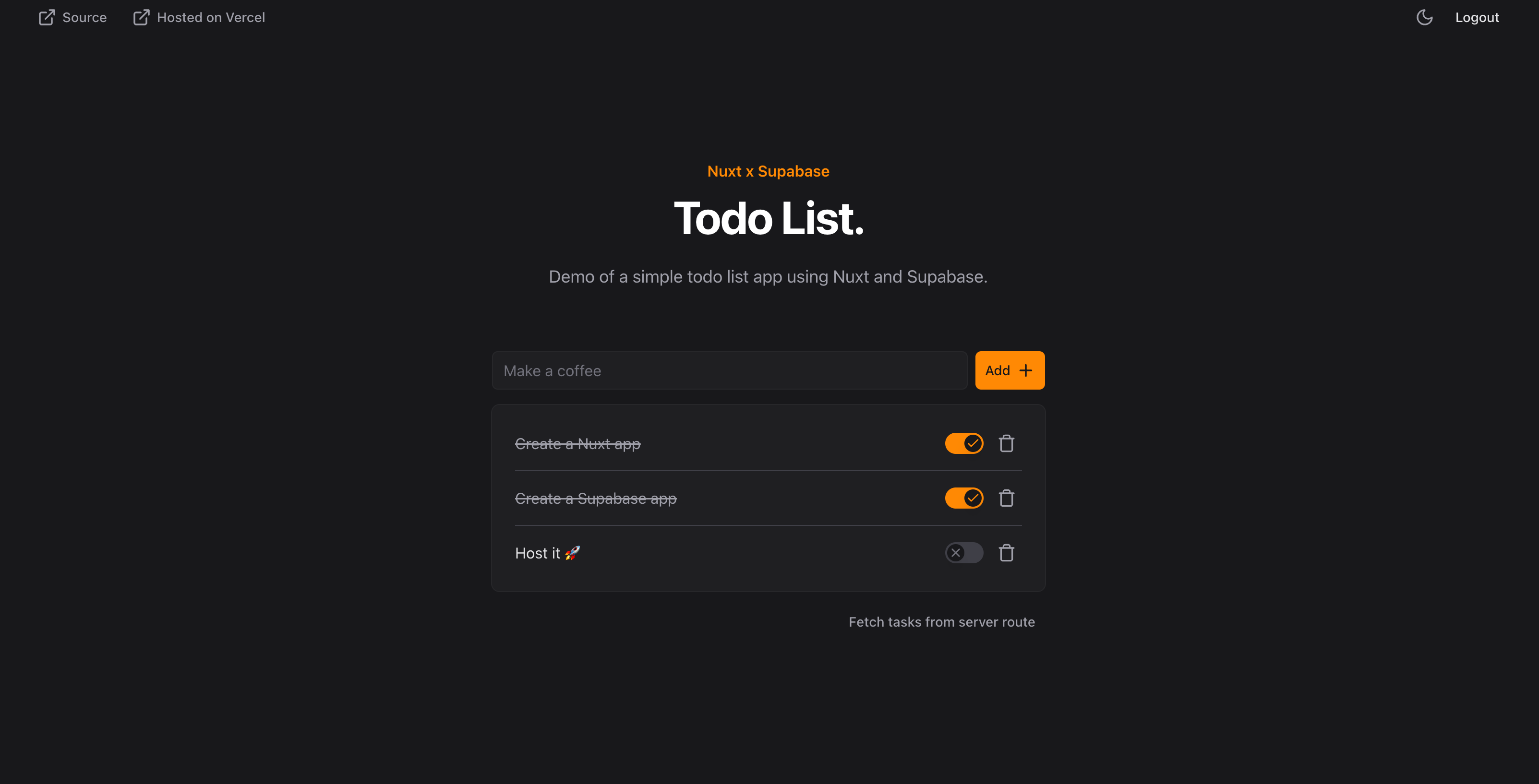
> Demonstration of using Supabase with Nuxt.
Demonstration of using Supabase with Nuxt.
## Live demo
You can play with the demo on [https://supabase-demo-gamma.vercel.app](https://supabase-demo-gamma.vercel.app)
## Running locally
Follow the instruction in the [demo Readme](https://github.com/nuxt-modules/supabase/blob/main/demo/README.md).
## Source code
The source code is available on Github in the [demo/ directory](https://github.com/nuxt-modules/supabase/tree/main/demo).
# Introduction
> @nuxtjs/supabase is a Nuxt module for first class integration with Supabase.
[@nuxtjs/supabase](https://github.com/nuxt-modules/supabase) is a Nuxt module for first class integration with Supabase.
Checkout the [Nuxt](https://nuxt.com/) documentation and [Supabase](https://supabase.com) to learn more.
For integrating Supabase with Nuxt 2, checkout [supabase-community/nuxt-supabase](https://github.com/supabase-community/nuxt-supabase).
## Installation
Add `@nuxtjs/supabase` dev dependency to your project:
```bash
npx nuxi@latest module add supabase
```
Add `@nuxtjs/supabase` to the `modules` section of `nuxt.config.ts`:
```ts [nuxt.config.ts]
export default defineNuxtConfig({
modules: ['@nuxtjs/supabase'],
})
```
Add `NUXT_PUBLIC_SUPABASE_URL` and `NUXT_PUBLIC_SUPABASE_KEY` to the `.env`:
```bash [env]
NUXT_PUBLIC_SUPABASE_URL="https://example.supabase.co"
NUXT_PUBLIC_SUPABASE_KEY=""
```
The legacy `SUPABASE_URL` and `SUPABASE_KEY` env variables are still supported as fallbacks. Using the `NUXT_` prefix is recommended as it follows Nuxt's [runtimeConfig](https://nuxt.com/docs/guide/going-further/runtime-config) convention and allows overriding values at runtime without rebuilding.
## Options
You can configure the supabase module by using the `supabase` key in `nuxt.config`:
```ts [nuxt.config.ts]
export default defineNuxtConfig({
// ...
supabase: {
// Options
}
}
```
### `url`
Default: `NUXT_PUBLIC_SUPABASE_URL` env variable (falls back to `SUPABASE_URL`) (ex: [https://example.supabase.co](https://example.supabase.co))
The unique Supabase URL which is supplied when you create a new project in your project dashboard.
### `key`
Default: `NUXT_PUBLIC_SUPABASE_KEY` env variable (falls back to `SUPABASE_KEY`)
Supabase `publishable key`, used to verify and decode the JWT. Can bypass the Supabase API gateway and interact with your Supabase database applying RLS Policies.
In `v1.x.x` and earlier, this was referring to the `anon key`. With the introduction of JWT signing keys, Supabase now needs a "publishable key" to decode the JWT and let you interact with your database.
### `secretKey`
Default: `NUXT_SUPABASE_SECRET_KEY` env variable (falls back to `SUPABASE_SECRET_KEY`)
Supabase `secret key`, has super admin rights and can bypass your Row Level Security.
This key is server-only and never exposed to the client. Keep it in environment variables.
### `serviceKey`
Default: `NUXT_SUPABASE_SERVICE_KEY` env variable (falls back to `SUPABASE_SERVICE_KEY`)
*Legacy API key* used before signing JWT keys were introduced. Use `secretKey` instead. This option will be removed in a future version.
Supabase 'service role key', has super admin rights and can bypass your Row Level Security.
### `useSsrCookies`
Default: `true`
Controls whether the module uses cookies to share session info between server and client. You *must* enable this option if you need to access session or user info from the server. It will use the SSR client from the [@supabase/ssr](https://github.com/supabase/ssr) library.
When disabled, the module will use the default Supabase client from the [@supabase/supabase-js](https://github.com/supabase/supabase-js) library which stores session info in local storage. This is useful in certain cases, such as statically generated sites or mobile apps where cookies might not be available.
When `useSsrCookies` is `true` the following options cannot be customized with `clientOptions`:
- `flowType`, `autoRefreshToken`, `detectSessionInUrl`, `persistSession`, `storage`
If you need to customize one of the above options, you must set `useSsrCookies` to `false`. Bear in mind that this will disable SSR support, you'll need to take care of it yourself if needed.
### `redirect`
Default: `true`
Redirect automatically to the configured login page if a non authenticated user is trying to access a guarded. You can disable all redirects by setting this option to false.
### `redirectOptions`
Default:
```ts [nuxt.config.ts]
redirectOptions: {
login: '/login',
callback: '/confirm',
include: undefined,
exclude: [],
saveRedirectToCookie: false,
}
```
- `login`: User will be redirected to this path if not authenticated or after logout.
- `callback`: This is the path the user will be redirect to after supabase login redirection. Should match configured `redirectTo` option of your [signIn method](https://supabase.com/docs/reference/javascript/auth-signinwithoauth). Should also be configured in your Supabase dashboard under `Authentication -> URL Configuration -> Redirect URLs`.
- `include`: Routes to include in the redirect. `['/admin(/*)?']` will enable the redirect only for the `admin` page and all sub-pages.
- `exclude`: Routes to exclude from the redirect. `['/foo', '/bar/**']` will exclude the `foo` page and all pages in your `bar` folder.
- `saveRedirectToCookie`: Automatically sets a cookie containing the path an unauthenticated user tried to access. The value can be accessed using the [`useSupabaseCookieRedirect`](https://supabase.nuxtjs.org/composables/usesupabasecookieredirect) composable to redirect the user to the page they previously tried to visit.
### `cookiePrefix`
Default: `sb-{your-project-id}-auth-token`
The prefix used for all supabase cookies, and the redirect cookie.
By default, the cookie prefix is the same as the default storage key from the supabase-js client. This includes your project id, and will look something like this: `sb-ttc1xwfwkoleowdqayb19-auth-token`
If the `useSsrCookies` option is set to `false`, this option will not affect supabase, and only apply to the `useSupabaseCookieRedirect` cookie.
### `cookieOptions`
```ts
cookieOptions: {
maxAge: 60 * 60 * 8,
sameSite: 'lax',
secure: true
}
```
Options for cookies used to share tokens between server and client, refer to [cookieOptions](https://nuxt.com/docs/api/composables/use-cookie#options) for available settings. Please note that the lifetime set here does not determine the Supabase session lifetime.
### `types`
Default: `~/types/database.types.ts`
The path for the generated Supabase TypeScript definitions. The database definitions will be automatically passed to all clients: `useSupabaseClient`, `serverSupabaseClient` and `serverSupabaseServiceRole`.
`~/` resolves to your Nuxt source directory: the `app/` directory when present (Nuxt 4 default), otherwise the project root (Nuxt 3 or Nuxt 4 without an `app/` directory).
```bash
## Generate types from live database
supabase gen types --lang=typescript --project-id YourProjectId > app/types/database.types.ts
## Generate types when using local environment
supabase gen types --lang=typescript --local > app/types/database.types.ts
```
Drop the `app/` prefix if your project doesn't have an `app/` directory. To store the file outside `srcDir` (e.g. at the project root alongside `app/`), set `supabase.types` to the matching path, for example `'~~/types/database.types.ts'`.
Set to `false` to disable.
Check Supabase [documentation](https://supabase.com/docs/reference/javascript/release-notes#typescript-support) for further information.
### `clientOptions`
Default:
```ts
clientOptions: { }
```
Customize the Supabase client options [available here](https://supabase.com/docs/reference/javascript/initializing#parameters).
If `useSsrCookies` is enabled, these options will be merged with values from `@supabase/ssr`, and some of the [options cannot be customized](https://supabase.nuxtjs.org/getting-started/introduction#usessrcookies).
```ts
clientOptions: {
auth: {
flowType: 'pkce',
autoRefreshToken: isBrowser(),
detectSessionInUrl: isBrowser(),
persistSession: true,
},
}
```
### `timezone`
Default: `''`
Time zone PostgREST should answer in, sent as the [`Prefer: timezone`](https://docs.postgrest.org/en/v12/references/api/preferences.html#timezone) header.
```ts
timezone: 'browser'
```
Set to `'browser'` to use the viewer's own zone, resolved in the browser. Any other value is used verbatim and must be an IANA name, which pins the client and the server to the same zone.
```ts
timezone: 'America/Los_Angeles'
```
This matters because `now()::date`, `current_date` and any `timestamptz` cast to a date resolve in the connection's time zone, and PostgREST leaves that at UTC. A view comparing a `date` column against `current_date` therefore answers on UTC's day, which is already tomorrow for part of every working day west of Greenwich. It is also the only way to tell a *view*, which cannot take the day as an argument the way a function can.
A `timestamptz` in the response is rendered with this offset rather than `+00:00` — the same instant, written differently. Client code that compares timestamps as **strings** should compare instants instead (`Date.parse(a) < Date.parse(b)`), because a lexicographic comparison is only reliable while every value carries the same offset.
`'browser'` names a zone only the browser knows, so the server client leaves PostgREST on its own zone. Pass an IANA name if you need both to agree during SSR.
### `cookieName`
This option is deprecated, use [`cookiePrefix`](https://supabase.nuxtjs.org/getting-started/introduction#cookieprefix) instead.
Default: `sb`
Cookie name used for storing the redirect path when using the `redirectOptions.cookieRedirect` option, added in front of `-redirect-path` to form the full cookie name e.g. `sb-redirect-path`
### `redirectOptions.cookieRedirect`
This option is deprecated, use [`redirectOptions.saveRedirectToCookie`](https://supabase.nuxtjs.org/getting-started/introduction#redirectoptions) instead.
Default: `false`
Use the `cookieRedirect` option to store the redirect path in a cookie.
## Demo
A live demo is made for you to see this module in action on [https://supabase-demo-gamma.vercel.app](https://supabase-demo-gamma.vercel.app), read more in the [demo section](https://supabase.nuxtjs.org/getting-started/demo).

Also checkout the [YouTube video](https://www.youtube.com/watch?v=jIyiRT6zT8Q) about its usage in a live demo.
# Migration Guide
> Learn how to migrate @nuxtjs/supabase to take advantage of JWT signing keys support
This guide will help you migrate from `v1.x` to `v2.x`, which introduces support for Supabase's new JWT signing keys.
## 🔐 What are JWT Signing Keys?
Supabase has introduced a major security improvement by moving from symmetric to asymmetric JWT (JSON Web Token) signing. This change brings security and performance improvements in how your applications handle authentication.
### The Problem with Symmetric Keys
Previously, Supabase used a single shared secret key for both creating and verifying tokens. This meant your app had to constantly call `supabase.auth.getUser()` to check if sessions were valid, creating network delays calling the Supabase Auth server.
### The Solution with Asymmetric JWT Signing Keys
The new system uses two separate keys:
- A private key (kept secure by Supabase) for creating tokens.
- A public key (safe to share in your application) for verifying them.
Your application can now verify user sessions locally without contacting Supabase servers, making it faster and more reliable. This new key is named as `publishable key` on Supabase.
### Key Benefits
This upgrade eliminates authentication bottlenecks, improves security, and makes your applications work better at the edge (no extra calls to the Supabase Auth server).
Read the full technical explanation in the official Supabase blog post.
## 🚨 Breaking changes
### 1. `useSupabaseUser` Type Changes
`useSupabaseUser` now returns **JWT claims** instead of the full **User object**.
- **Before (v1.x):** `useSupabaseUser` returned the full `User` object from [auth.getUser()](https://supabase.com/docs/reference/javascript/auth-getuser)
- **After (v2.x):** `useSupabaseUser` returns `Claims` object from [auth.getClaims()](https://supabase.com/docs/reference/javascript/auth-getclaims) as a [JWT Payload](https://supabase.com/docs/guides/auth/jwts)
```json [auth.getUser() as .json]
{
id: "11111111-1111-1111-1111-111111111111",
aud: "authenticated",
role: "authenticated",
email: "example@email.com",
email_confirmed_at: "2024-01-01T00:00:00Z",
phone: "",
confirmed_at: "2024-01-01T00:00:00Z",
last_sign_in_at: "2024-01-01T00:00:00Z",
app_metadata: {},
user_metadata: {},
identities: []
}
```
```json [auth.getClaims().claims as .json]
{
session_id: "11111111-1111-1111-1111-111111111111",
sub: "11111111-1111-1111-1111-111111111111",
aud: "authenticated",
role: "authenticated",
email: "example@email.com",
aal: "aal1",
amr: [],
exp: 1715769600,
iat: 1715766000,
is_anonymous: false,
iss: "https://project-id.supabase.co/auth/v1",
phone: "+13334445555",
app_metadata: {},
user_metadata: {},
// identities is missing
// last_sign_in_at is missing
// confirmed_at is missing
// email_confirmed_at is missing
}
```
If you need the full User object, you'll need to explicitly call `auth.getUser()` but if you only need basic info (email, role...) no changes are required.
### 2. Environment variables changes
**Remaining key** → **SUPABASE_KEY** is now storing the `publishable key` instead of the `anon key`
**New key** → **SUPABASE_SECRET_KEY** is now storing the `secret key` of your Supabase project
**Deprecated key** → **SUPABASE_SERVICE_KEY** was previously storing the `service_role key` but is now deprecated in favor of `SUPABASE_SECRET_KEY`
## 📋 Migration Steps
### 1. Types changes
The first thing you need to do is to ensure the `useSupabaseUser` changes do not affect your existing code.
Once you've updated the types, you can already test your application and it should still work as expected.
### 2. Environment variables changes
The **Good news** ☀️ is that everything will continue to work as-is with your existing `SUPABASE_KEY` (aka `anon key`).
Same for `SUPABASE_SERVICE_KEY`, if you're using it to bypass Row Level Security, you will face a deprecation warning but it will still work.
However, we highly recommend you to enable JWT signing keys in your Supabase project and use your publishable key as `SUPABASE_KEY` and your secret key as `SUPABASE_SECRET_KEY`.
#### 2.a. Enable JWT Signing Keys in Supabase Dashboard
Before migrating your environment variables, you need to enable JWT signing keys and thus create your JWT and API keys in your Supabase project:
**Watch this video tutorial** from **6:20 to 12:20** to understand how to enable JWT signing keys in your Supabase dashboard and get your new secret key.
#### 2.b. Use your new keys in your `.env` file
```bash [.env]
NUXT_PUBLIC_SUPABASE_KEY=
NUXT_SUPABASE_SECRET_KEY=
```
The legacy `SUPABASE_KEY` and `SUPABASE_SECRET_KEY` env variables are still supported as fallbacks. See the [introduction](https://supabase.nuxtjs.org/getting-started/introduction) for details.
# serverSupabaseClient
> Make requests to the Supabase API on server side with the serverSupabaseClient service
This section assumes you're familiar with [Nitro](https://v3.nuxtjs.org/guide/concepts/server-engine), the server engine powered by Nuxt.
This function is working similary as the [useSupabaseClient](https://supabase.nuxtjs.org/composables/usesupabaseclient) composable but is designed to be used in [server routes](https://nuxt.com/docs/guide/directory-structure/server#server-routes).
Define your server route and just import the `serverSupabaseClient` from `#supabase/server`. Be careful, `serverSupabaseClient` is returning a promise.
```ts [server/api/libraries.ts]
import { serverSupabaseClient } from '#supabase/server'
export default eventHandler(async (event) => {
const client = await serverSupabaseClient(event)
const { data } = await client.from('libraries').select('*')
return { libraries: data }
})
```
Then call your API route from any vue file:
```ts [pages/index.vue]
const fetchLibrary = async () => {
const { libraries } = await $fetch('/api/libraries')
}
```
Be careful, if you want to call this route on SSR, please read this [section](https://nuxt.com/docs/getting-started/data-fetching#pass-client-headers-to-the-api), you must send your browser cookies including your supabase token.
```ts [pages/index.vue]
const { data: { libraries }} = await useFetch('/api/libraries', {
headers: useRequestHeaders(['cookie'])
})
```
# serverSupabaseServiceRole
> Make requests with super admin rights to the Supabase API with the serverSupabaseServiceRole service
This section assumes you're familiar with [Nitro](https://v3.nuxtjs.org/guide/concepts/server-engine), the server engine powered by Nuxt.
This function is designed to work only in [server routes](https://nuxt.com/docs/guide/directory-structure/server#server-routes), there is no vue composable equivalent.
It works similary as the [serverSupabaseClient](https://supabase.nuxtjs.org/services/serversupabaseclient) but it provides a client with super admin rights that can bypass your [Row Level Security](https://supabase.com/docs/guides/auth/row-level-security).
> The client is initialized with the `NUXT_SUPABASE_SECRET_KEY` you must have in your `.env` file. See the [Supabase blog post](https://supabase.com/blog/jwt-signing-keys) for more on JWT signing keys.
Define your server route and just import the `serverSupabaseServiceRole` from `#supabase/server`.
```ts [server/api/bypass-rls.ts]
import { serverSupabaseServiceRole } from '#supabase/server'
export default eventHandler(async (event) => {
const client = serverSupabaseServiceRole(event)
const { data } = await client.from('rls-protected-table').select()
return { sensitiveData: data }
})
```
Then call your API route from any vue file:
```ts [pages/index.vue]
const fetchSensitiveData = async () => {
const { sensitiveData } = await useFetch('/api/bypass-rls')
}
```
# serverSupabaseSession
> Get your Supabase user's session from serverside with the serverSupabaseUser service
This section assumes you're familiar with [Nitro](https://v3.nuxtjs.org/guide/concepts/server-engine), the server engine powered by Nuxt.
This function is similar to the [useSupabaseSession](https://supabase.nuxtjs.org/composables/usesupabasesession) composable but is used in [server routes](https://nuxt.com/docs/guide/directory-structure/server#server-routes).
Be advised that `serverSupabaseSession` is considered unsafe, since the session comes from the client and users can tamper with it. For checking if the user is logged in, always use [serverSupabaseUser](https://supabase.nuxtjs.org/services/serversupabaseuser)
Define your server route and import the `serverSupabaseSession` from `#supabase/server`.
```ts [server/api/session.ts]
import { serverSupabaseSession } from '#supabase/server'
export default defineEventHandler(async (event) => {
return await serverSupabaseSession(event)
})
```
Then call your api route from any vue file:
```ts [pages/index.vue]
const session = ref(null)
const fetchSession = async () => {
session.value = await $fetch('/api/session')
}
```
Be careful, if you want to call this route on SSR, please read this [section](https://nuxt.com/docs/getting-started/data-fetching#isomorphic-fetch-and-fetch), you must send your browser cookies including your supabase token.
```ts [pages/index.vue]
const session = ref(null)
const { data } = await useFetch('/api/session', {
headers: useRequestHeaders(['cookie'])
})
session.value = data
```
# serverSupabaseUser
> Get your Supabase user from serverside with the serverSupabaseUser service
This section assumes you're familiar with [Nitro](https://v3.nuxtjs.org/guide/concepts/server-engine), the server engine powered by Nuxt.
This function is similar to the [useSupabaseUser](https://supabase.nuxtjs.org/composables/usesupabaseuser) composable but is used in [server routes](https://nuxt.com/docs/guide/directory-structure/server#server-routes).
Define your server route and import the `serverSupabaseUser` from `#supabase/server`.
```ts [server/api/me.ts]
import { serverSupabaseUser } from '#supabase/server'
export default defineEventHandler(async (event) => {
return await serverSupabaseUser(event)
})
```
Then call your api route from any vue file:
```ts [pages/index.vue]
const user = ref(null)
const fetchMe = async () => {
user.value = await $fetch('/api/me')
}
```
Be careful, if you want to call this route on SSR, please read this [section](https://nuxt.com/docs/getting-started/data-fetching#isomorphic-fetch-and-fetch), you must send your browser cookies including your supabase token.
```ts [pages/index.vue]
const user = ref(null)
const { data } = await useFetch('/api/me', {
headers: useRequestHeaders(['cookie'])
})
user.value = data
```
```vue [pages/login.vue]
```
Nuxt
Supabase
A supa simple wrapper around supabase-js to enable usage and integration within Nuxt.
Get started
Star on GitHub
Nuxt Supabase v2 →
Shipped with many features
Nuxt 3 and 4 ready
Experience the power and flexibility of Nuxt 3 and Nuxt 4, optimized for modern web development.
Vue 3 composables
Leverage the reusability and efficiency of Vue 3 composables in your projects.
Supabase-js V2
Empower Supabase for robust backend functionality.
Usage in API server routes
Implement Supabase in your API server routes.
Authentication support with JWT signing keys
Secure your applications with authentication support provided by Supabase with JWT signing keys support.
TypeScript support
Enjoy a fully typed development experience.
## Resources for Agents
- [API catalog: every service document this site publishes](https://supabase.nuxtjs.org/.well-known/api-catalog)
- [Sitemap (XML)](https://supabase.nuxtjs.org/sitemap.xml)
- [Sitemap (Markdown): every page on the site](https://supabase.nuxtjs.org/sitemap.md)
- [MCP server card: MCP endpoint at https://supabase.nuxtjs.org/mcp](https://supabase.nuxtjs.org/.well-known/mcp/server-card.json)
- [MCP endpoint (streamable HTTP)](https://supabase.nuxtjs.org/mcp)
- [llms.txt: index of the documentation for LLMs](https://supabase.nuxtjs.org/llms.txt)
- [llms-full.txt: the full documentation as a single file](https://supabase.nuxtjs.org/llms-full.txt)
- [OpenAPI document: every route this site serves to agents](https://supabase.nuxtjs.org/openapi.json)